3 journeys
The guest journey
From tent to settled bill

Scans the tent on the table
The menu opens with photos and prices. No app needed.
See it:Guest sits down and orders, step 1Orders from their phone
Everyone at the table can add dishes to the same bill.
See it:Three screens, one order, step 1Is the table held for a booking?
Yes
The dishes wait on the board
Orders at a table held for a booking wait for staff to seat the party.
See it:Guest sits down and orders, step 3A waiter taps Seated
Staff seat the party and release the held order.
See it:Three screens, one order, step 2
No hold
The clocks start at once
The kitchen sees each dish's due time.
See it:Three screens, one order, step 2
The kitchen cooks each dish to its own due time
Guests follow each dish from cooking to ready.
See it:Three screens, one order, step 5Still hungry?
Adds to the order
It joins the same bill
New dishes join the bill with their own preparation times.
See it:Guest sits down and orders, step 2
No
Nothing to do
The existing order continues.
Ready for the waiter
Ready dishes appear under Serve now with their table number.
See it:Three screens, one order, step 3Delivered in one tap
Staff mark each dish delivered after serving it.
See it:Three screens, one order, step 4How do they pay?
From the phone
Split, tip, pay
Split by share or dish, add a tip and pay into the venue's connected account.
See it:Paying the bill, step 1Receipt on screen
The guest can view their payment receipt.
See it:Paying the bill, step 2
Asks for the bill
One tap beside Pay
The floor plan shows the bill request until staff settle it.
See it:Paying the bill, step 3Cash or the card machine
Staff record the payment on the bill.
See it:Paying the bill, step 5
A member?
Signed in
The payment earns
Members earn on their payments, including cash. Tips do not earn points.
See it:Guest becomes a regular, step 5
Not yet
Joining is one short form
Guests fill in their details and verify by WhatsApp.
See it:Guest becomes a regular, step 1
The table settles, and every screen agrees
The floor plan shows the paid bill. Unserved dishes stay on the kitchen board.
See it:Three screens, one order, step 6
From booking link to seated party
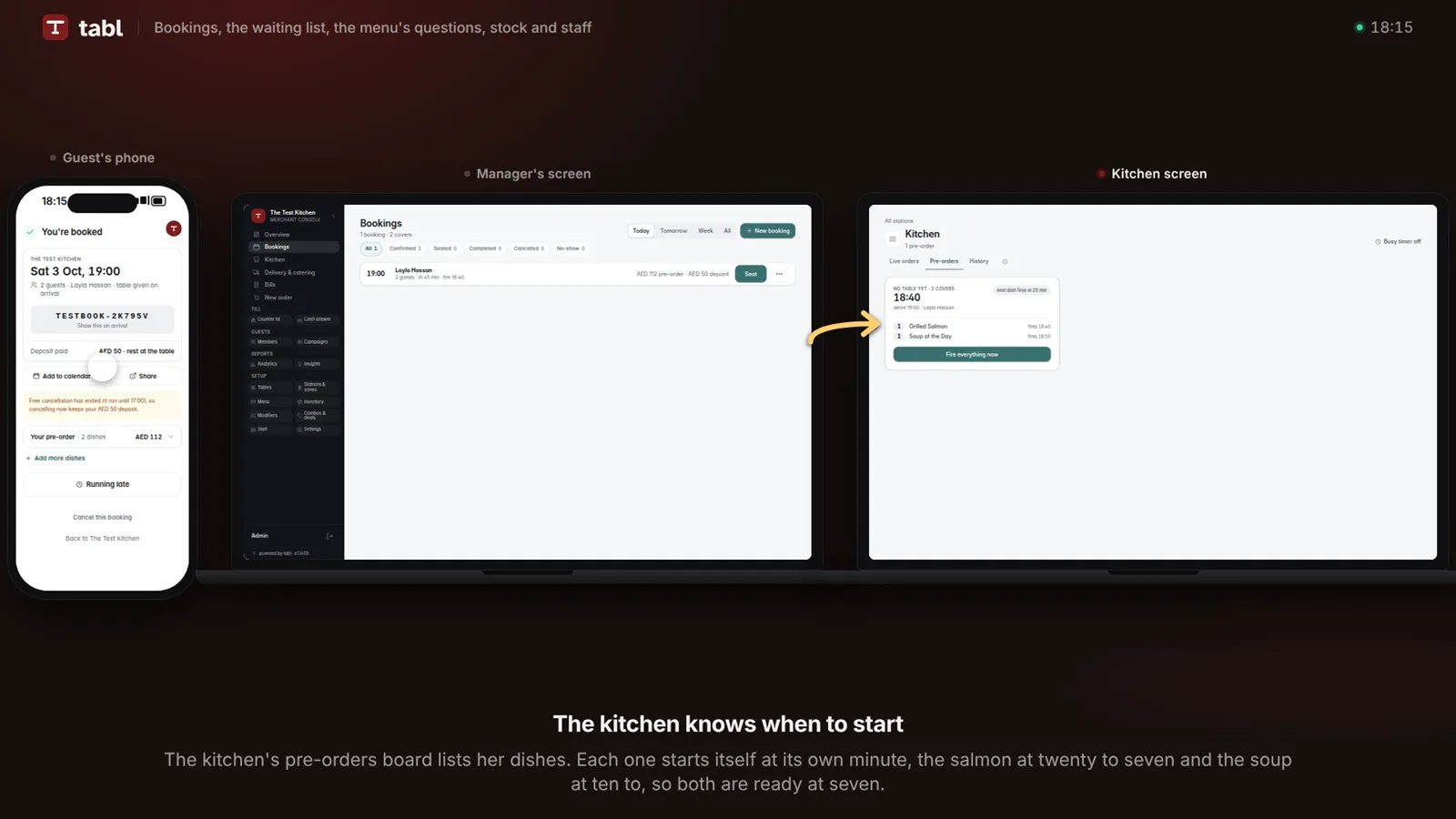
Books on your link
Guests choose a time within the restaurant's available capacity.
See it:Booking becomes dinner, on time, step 1Order ahead?
Pre-orders
Picks the dishes, pays the deposit
The deposit counts towards the bill. Members see their member prices.
See it:Booking becomes dinner, on time, step 2
Just the table
Confirmed with a booking code
Guests use their booking code to view, move or cancel the booking.
See it:Booking becomes dinner, on time, step 3
A confirmation on WhatsApp
Use your number or ours. Staff can check message status.
See it:Booking becomes dinner, on time, step 5A reminder before arrival
The reminder links to the booking so guests can update their arrival time.
See it:Booking becomes dinner, on time, step 5On time?
Running late
Pushes the booking back
The kitchen adjusts preparation times when the guest moves the booking.
See it:Booking becomes dinner, on time, step 2
Not here yet
Arrival follow-ups
Late guests receive follow-up messages. Staff decide whether to mark a no-show.
See it:Booking becomes dinner, on time, step 3
On time
Staff seat the party
Staff choose a table and seat the party.
See it:Booking becomes dinner, on time, step 3
Food timed for arrival
Each dish starts according to its preparation time and the booking's serving time.
See it:Booking becomes dinner, on time, step 4Dinner, then the rest of the bill
Guests can order more and pay the remaining balance by phone or through staff.
See it:Three screens, one order, step 6
From joining to a year of visits
Joins with one short form
Guests verify by WhatsApp, or staff enrol them with a sign-in QR.
See it:Guest becomes a regular, step 1The card lives in their phone
The card shows points, tier progress and a QR code. Guests can save it to their home screen.
See it:Guest becomes a regular, step 2How do they visit?
Scans the table
The bill is theirs from the first dish
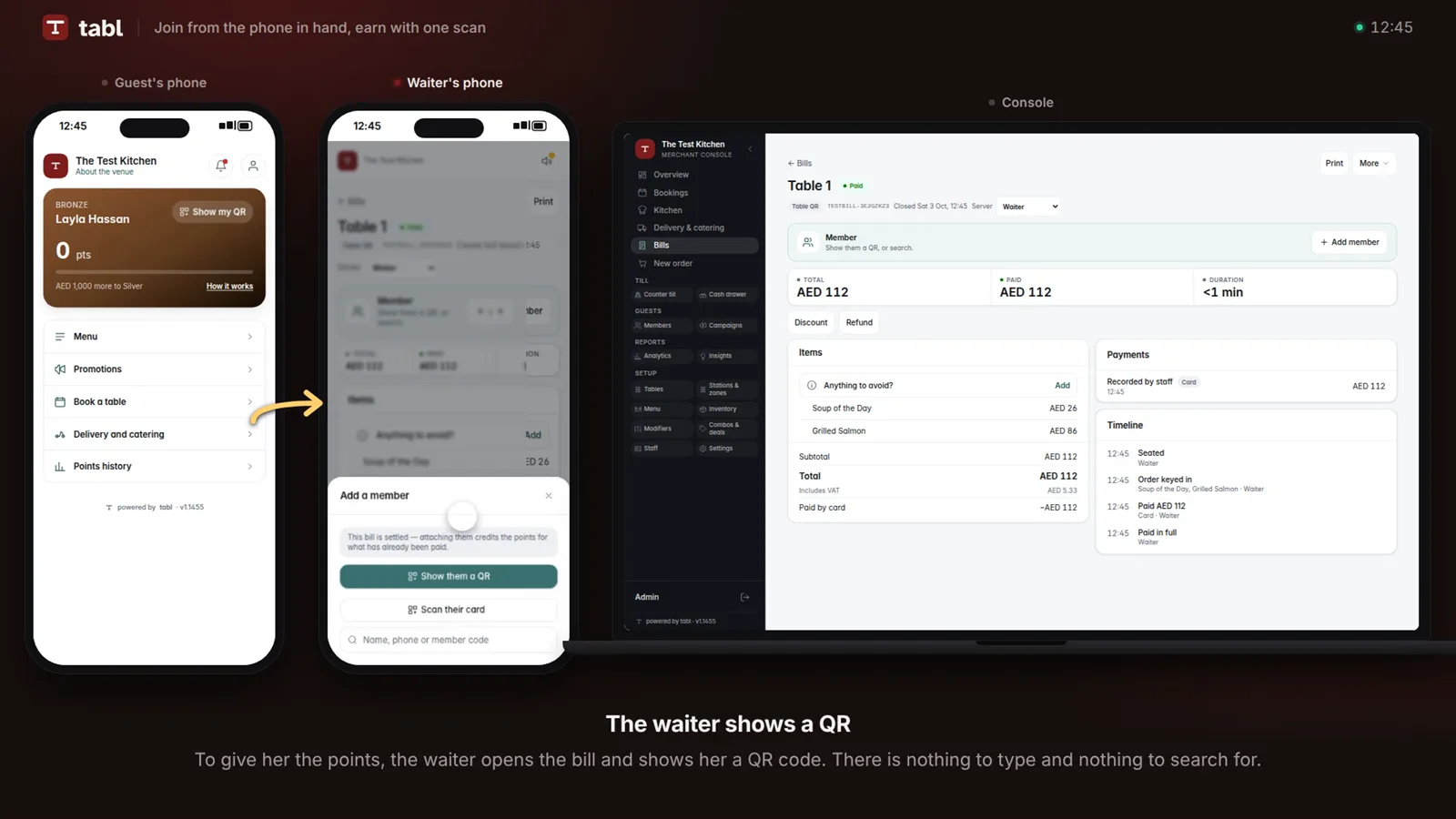
A signed-in member who scans the table's QR is known to be at that table. The bill carries their name, whoever keys the order.
See it:Guest becomes a regular, step 3
Not signed in
The guest scans the bill
Staff show a QR on the bill, and the guest scans it to claim its points, before or after paying.
See it:Guest becomes a regular, step 4
Every settled payment earns
Members earn on their payments, including cash. Tips do not earn points.
See it:Guest becomes a regular, step 5Points, or a wallet?
Points
Points buy dishes you price
Members redeem from their phone or through staff.
See it:Guest becomes a regular, step 4
Wallet
A prepaid balance in dirhams
Members top up by phone or at the counter, with the bonus you set.
See it:Regular pays ahead, step 2
A campaign lands in their pocket
Target offers by tier, birthday or recent activity.
See it:Campaign brings them back, step 3A bigger order?
Catering for the office
Quoted at the member rate
Staff review the request before cooking or charging.
See it:Delivery and catering, step 1
Delivery home
To the address on their profile
Delivery areas and minimum orders apply. Cash payments can earn points.
See it:Delivery and catering, step 2
Every point accounted for
Members can check every point earned and spent.
See it:Guest becomes a regular, step 6